Gregory: A Playful Font with Practical Potential
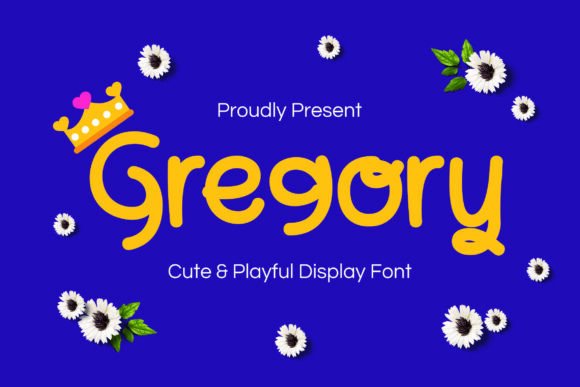
Fonts are more than just letters on a page—they shape how your message is received. Gregory, a delightfully cute and playful display font, stands out as a versatile option for branding, social media graphics, nursery decor, children’s book titles, and cheerful quotes. Its whimsical design invites warmth and personality, making it a popular choice for creatives aiming to spark joy in their audience. However, like any design tool, its effectiveness hinges on how it’s used.
Why Gregory Captures Attention
Gregory’s charm lies in its rounded edges, bouncy baseline, and expressive letterforms. It’s crafted to feel approachable and energetic, qualities that resonate well in design contexts aimed at children or lighthearted messaging. Whether you’re designing a nursery wall print or a social media post for a boutique brand, Gregory adds a touch of personality that can elevate your visual communication.
What makes Gregory especially versatile is its ability to adapt across mediums. From print to digital, it maintains clarity and character. Yet, its playful nature means it’s not a one-size-fits-all solution. Understanding its strengths—and its limitations—can help you avoid common missteps.
Common Mistakes When Choosing and Using Gregory
Many designers fall into predictable traps when selecting and applying display fonts like Gregory. These errors can compromise readability, professionalism, and overall design effectiveness. Let’s explore some of the most frequent issues and how to address them.
1. Overusing Gregory in Inappropriate Contexts
Gregory’s playful design makes it ideal for fun, informal settings. However, using it in formal or professional materials—like legal documents, corporate reports, or academic presentations—can undermine the seriousness of the content. The mismatch between tone and context may confuse your audience or reduce perceived credibility.
Better approach: Reserve Gregory for design projects that benefit from a lighthearted tone. If you're working on a logo for a toy brand or a birthday invitation, Gregory shines. For more formal applications, opt for a cleaner, more neutral font.
2. Ignoring Readability at Small Sizes
Display fonts are designed to stand out at larger sizes. Gregory is no exception. When used in small text—like body copy or captions—its intricate details can blur together, making it difficult to read.
Better approach: Use Gregory for headlines, titles, or short phrases where it can be clearly seen. Pair it with a simpler, more legible font for supporting text. This contrast not only improves readability but also enhances visual hierarchy.
3. Failing to Check Licensing Before Downloading
One of the most overlooked steps in font selection is verifying licensing. Gregory may be available through various platforms, but each may offer different usage rights. Some licenses allow for personal use only, while others extend to commercial projects or web embedding.
Better approach: Always review the license agreement before downloading or purchasing Gregory. If you’re unsure, contact the font provider for clarification. Avoid using unlicensed fonts in commercial work to prevent legal issues down the line.
4. Misjudging Color and Background Contrast
Gregory’s delicate lines and curves can get lost if placed against busy or similarly colored backgrounds. Designers sometimes overlook how contrast affects legibility, especially when using the font in social media graphics or printed materials.
Better approach: Test Gregory against various background colors and patterns. Use high-contrast combinations—like black text on a white background or white text on a dark backdrop—to ensure visibility. If using a textured background, consider adding a subtle drop shadow or outline to help the text stand out.
5. Assuming All Display Fonts Are Interchangeable
While many display fonts look similar at a glance, they each have unique characteristics that affect how they perform in different settings. Assuming Gregory will work the same way as another playful font can lead to inconsistent results.
Better approach: Always preview Gregory in your specific design context before committing. Compare it with similar fonts to see how it stacks up in terms of spacing, weight, and overall aesthetic. This helps ensure you’re choosing the best tool for the job.
How to Make the Most of Gregory
Using Gregory effectively requires a balance between creativity and practicality. Here are some tips to help you get the most out of this charming font:
- Pair it wisely: Combine Gregory with a clean sans-serif or serif font to maintain readability and visual balance.
- Limit its use: Stick to using Gregory for headlines, logos, or accent text rather than body copy.
- Test across platforms: If using Gregory in digital content, preview it on different devices and screen sizes to ensure legibility.
- Customize thoughtfully: If your design software allows, tweak letter spacing or kerning to improve readability without losing the font’s charm.
What to Check Before Downloading or Buying Gregory
Before incorporating Gregory into your project, consider the following:
- Licensing terms: Confirm whether the font can be used for personal, commercial, or web-based projects.
- Supported languages: Ensure the font includes the character sets needed for your content.
- Format compatibility: Check if the font is available in the file formats your design tools support (e.g., OTF, TTF).
- Design variations: Look for alternate weights or styles if you need flexibility within the same font family.
Final Thoughts
Gregory is more than just a pretty font—it’s a design tool that, when used correctly, can bring personality and warmth to your creative work. By avoiding common mistakes and making thoughtful choices about application, pairing, and licensing, you can ensure your designs not only look great but also communicate effectively.
Whether you’re a seasoned designer or just starting out, taking the time to understand Gregory’s strengths and limitations will help you make smarter, more impactful design decisions. And that’s something worth smiling about.