Capsplay: A Bold Fusion of Retro and Futuristic Design
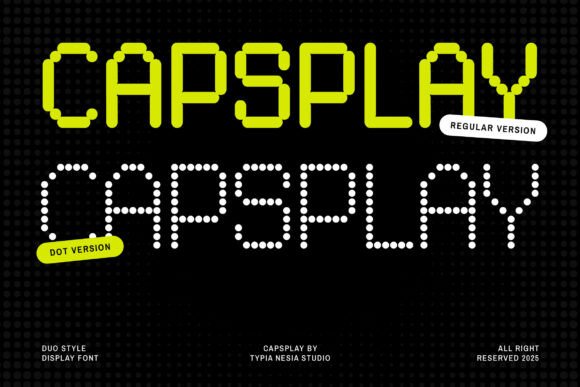
Capsplay is more than just a font—it’s a design tool that bridges the gap between nostalgic pixel art and sleek, modern tech aesthetics. This display font duo brings together two distinct styles: a clean, blocky structure and a playful dotted variant. Whether you're designing a logo, crafting a poster, or building a futuristic brand identity, Capsplay offers a versatile and visually striking solution.
Why Capsplay Appeals to Different Designers
Designers and creators come with varying goals, experience levels, and project needs. Capsplay meets many of these needs by offering flexibility without sacrificing style. Let’s explore how different audiences might approach and benefit from this font.
Beginners: A Gateway to Creative Typography
For newcomers to design, typography can feel intimidating. Capsplay simplifies the process with its clear, structured letterforms and built-in decorative elements. The font’s PUA encoding makes it easy to access special characters without needing advanced software. This accessibility helps beginners focus on creativity rather than technical hurdles.
- Use Capsplay to design social media graphics with a retro-futuristic flair.
- Create game titles for personal projects without needing deep design experience.
Experienced Designers: Precision and Flexibility
Professionals who work on branding, UI design, or digital campaigns will appreciate Capsplay’s full character set and support for ligatures and alternates. These features allow for more nuanced and polished designs. The font’s dual styles also open up creative possibilities, such as using the dotted version for background elements and the blocky version for headlines.
- Use the blocky style for strong branding materials like logos and packaging.
- Incorporate the dotted variant into digital interfaces for a subtle, modern touch.
- Experiment with layered text effects in posters or advertisements.
Creators and Educators: Tools for Expression and Learning
Capsplay isn’t limited to visual designers. Content creators, educators, and bloggers can use it to enhance presentations, course materials, or video thumbnails. The font’s bold personality helps visuals stand out, especially in digital formats where clarity and impact are key.
For example:
- Teachers can use Capsplay to make learning materials more engaging for students, especially in tech or design-related courses.
- YouTube creators can incorporate the font into thumbnails and intro sequences to establish a unique visual identity.
Entrepreneurs and Small Business Owners: Branding with Character
Small business owners and entrepreneurs often need to make a strong visual impression with limited resources. Capsplay offers a high-quality, adaptable font solution that can elevate branding without requiring custom typography. Whether launching a new tech startup or redesigning a product label, the font’s modern-retro aesthetic adds a memorable touch.
Consider these practical uses:
- Design app icons or website headers that reflect a tech-forward identity.
- Create packaging or promotional materials that stand out in niche markets like gaming or digital products.
Consumers and Hobbyists: Fun and Functional Design
Even outside of professional design, Capsplay has a place in personal projects. Gamers, hobbyists, and DIY enthusiasts might use it for custom T-shirt prints, personal websites, or home-made arcade cabinet labels. Its retro inspiration makes it especially appealing to those who enjoy vintage gaming culture or digital art.
Some fun ideas include:
- Designing pixel-art style invitations or party flyers.
- Creating personalized merchandise with a futuristic or retro-tech look.
What Sets Capsplay Apart?
Capsplay stands out because it combines two complementary styles in one package. Unlike many fonts that offer only one visual approach, this duo gives you the freedom to mix and match. The inclusion of ligatures and alternate characters adds depth to your typographic choices, while PUA encoding ensures compatibility across platforms and design tools.
Whether you're aiming for clean professionalism or playful nostalgia, Capsplay delivers quality without the learning curve of more complex typefaces.
How to Decide If Capsplay Is Right for You
When evaluating a font for your project, consider your goals, technical comfort level, and the message you want to convey. Capsplay is ideal if:
- You want a font that bridges retro and modern aesthetics.
- Your project needs versatility across print and digital formats.
- You value ease of use and compatibility without sacrificing visual impact.
It may not be the best choice if you’re looking for a minimalist or highly traditional font style. However, for tech branding, game design, or any project that benefits from a confident, structured look, Capsplay is worth exploring.
Getting Started with Capsplay
Whether you're a seasoned designer or just starting out, downloading and using Capsplay is straightforward. Most modern design software supports PUA-encoded fonts, so you can begin experimenting right away. Start with a simple headline or logo, then explore the alternate characters to add unique flourishes.
Try pairing Capsplay with other geometric or sans-serif fonts to create visual contrast while maintaining a cohesive design language. And don’t be afraid to layer the two versions—blocky and dotted—for added depth and interest.
If you're ready to infuse your work with a blend of retro charm and futuristic flair, download Capsplay today and see how it transforms your next project.