Bloody Corpse: A Font That Delivers Chilling Impact
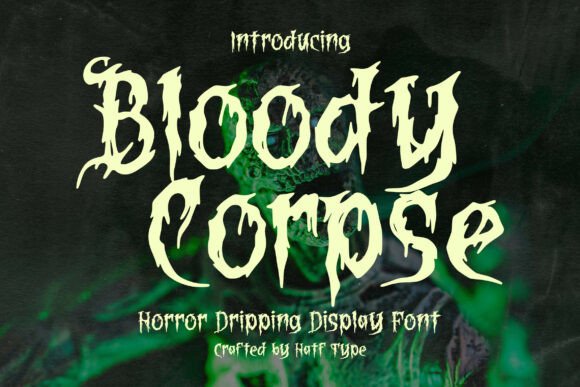
If you're looking to inject a sense of horror and theatrical drama into your design projects, Bloody Corpse could be exactly what you need. This display font, designed with a fresh blood drip effect on each letter, is tailor-made for Halloween graphics, horror movie posters, and survival game titles. Its bold, dramatic lines and dripping aesthetic evoke a visceral reaction, making it a compelling choice for creators aiming to unsettle or captivate their audience.
But like any design tool, Bloody Corpse isn't a one-size-fits-all solution. While its visual impact is undeniable, there are several considerations to keep in mind to ensure it enhances your project rather than hinders it. Let’s explore some of the common pitfalls and how you can avoid them.
Mistake 1: Overusing Bloody Corpse in Mixed Typography
One of the most frequent errors is combining Bloody Corpse with too many other fonts. Because of its intense visual presence, it can easily clash with other typefaces, especially those that are also stylistic or decorative. The result can be a chaotic design that confuses the viewer rather than drawing them in.
Better approach: Use Bloody Corpse as a headline or title font only. Pair it with clean, minimalist sans-serif or serif fonts for body text. For example, using Bloody Corpse for a horror movie poster title and a simple font like Helvetica or Garamond for supporting text creates visual balance and ensures readability.
Mistake 2: Ignoring Readability in Smaller Sizes
While Bloody Corpse looks stunning in large formats, it loses clarity when scaled down. The dripping blood effect, which adds to its dramatic flair, can blur the distinction between letters when used at small sizes.
Better approach: Reserve Bloody Corpse for large-scale applications such as posters, banners, or website headers. If you need to use it in smaller text, consider simplifying the design by removing or reducing the drip effect or using a different font altogether for subheadings or captions.
Mistake 3: Misjudging the Appropriate Context
Bloody Corpse is undeniably attention-grabbing, but it may not be appropriate for all types of projects. Using it in contexts where a more professional or neutral tone is expected—like business reports, formal invitations, or educational materials—can come across as jarring or unprofessional.
Better approach: Save Bloody Corpse for projects that demand a strong emotional response or a thematic tie-in with horror, Halloween, or thriller genres. If you're unsure, test the font in context by creating a quick mockup and asking for feedback from your target audience.
Mistake 4: Assuming All Versions Are Created Equal
There are often multiple versions or variations of Bloody Corpse available across different platforms. Some may be free but lack certain characters or stylistic options, while others might be premium versions with enhanced features. Using an incomplete or low-quality version can limit your design flexibility or cause technical issues.
Better approach: Before downloading or purchasing, check the font's character set, language support, and stylistic alternatives. If you're using it for a commercial project, confirm that the license allows for that use. Reputable font marketplaces like MyFonts, Fontspring, or Adobe Fonts usually provide detailed specifications and sample previews.
Mistake 5: Neglecting File Compatibility and Installation Issues
Even if you've chosen the right version of Bloody Corpse, compatibility issues can arise depending on your design software or operating system. Some fonts may not render correctly in certain programs, or they may require specific installation steps.
Better approach: Always test the font in your intended software before finalizing your design. If you're working with a team or handing off files, make sure all collaborators have access to the same font version. Embedding fonts or converting text to outlines (when appropriate) can help avoid display inconsistencies.
What to Check Before Using Bloody Corpse
Before committing to Bloody Corpse for your project, consider the following checklist:
- License Type: Is the font free for personal use only, or does it include a commercial license?
- Character Set: Does it include uppercase, lowercase, numbers, and punctuation?
- Software Compatibility: Does the font work in your primary design tools (e.g., Photoshop, Illustrator, Canva)?
- Visual Fit: Does the font match the tone and style of your overall design?
- Readability: Is the font legible at the size and spacing you plan to use?
When Bloody Corpse Works Best
Bloody Corpse shines in contexts where a dramatic, thematic font is needed to evoke a visceral reaction. Think of horror-themed branding, Halloween event flyers, or survival game titles where the font itself becomes part of the experience. It's also effective in digital marketing campaigns that aim to stand out with bold, eye-catching visuals.
For instance, a small indie game developer might use Bloody Corpse in their promotional material to immediately signal the game’s genre and tone. A blogger writing about horror films could integrate the font into a seasonal header image to enhance thematic appeal without sacrificing professionalism in the rest of the layout.
Final Thoughts
Bloody Corpse is more than just a novelty font—it's a design tool that, when used thoughtfully, can elevate your creative projects with a powerful visual punch. However, its effectiveness depends on how well you understand its strengths and limitations. Avoiding common mistakes like overuse, poor pairing, and misjudging context will ensure your design communicates exactly what you intend—without unintended distractions or readability issues.
By approaching Bloody Corpse with a strategic mindset and testing it in your specific context, you’ll be able to harness its full potential while maintaining a polished, professional look. Whether you're a seasoned designer or just starting out, this chilling font can be a valuable addition to your toolkit—if you know how to use it right.